Order-to-cash vs Contract-to-Cash: where B2B SaaS handoffs break
Order to cash automation starts at the order; SaaS revenue starts at the contract. The six handoffs where SaaS billing breaks, and the control for each.

Part of the accounts receivable and collections guide.
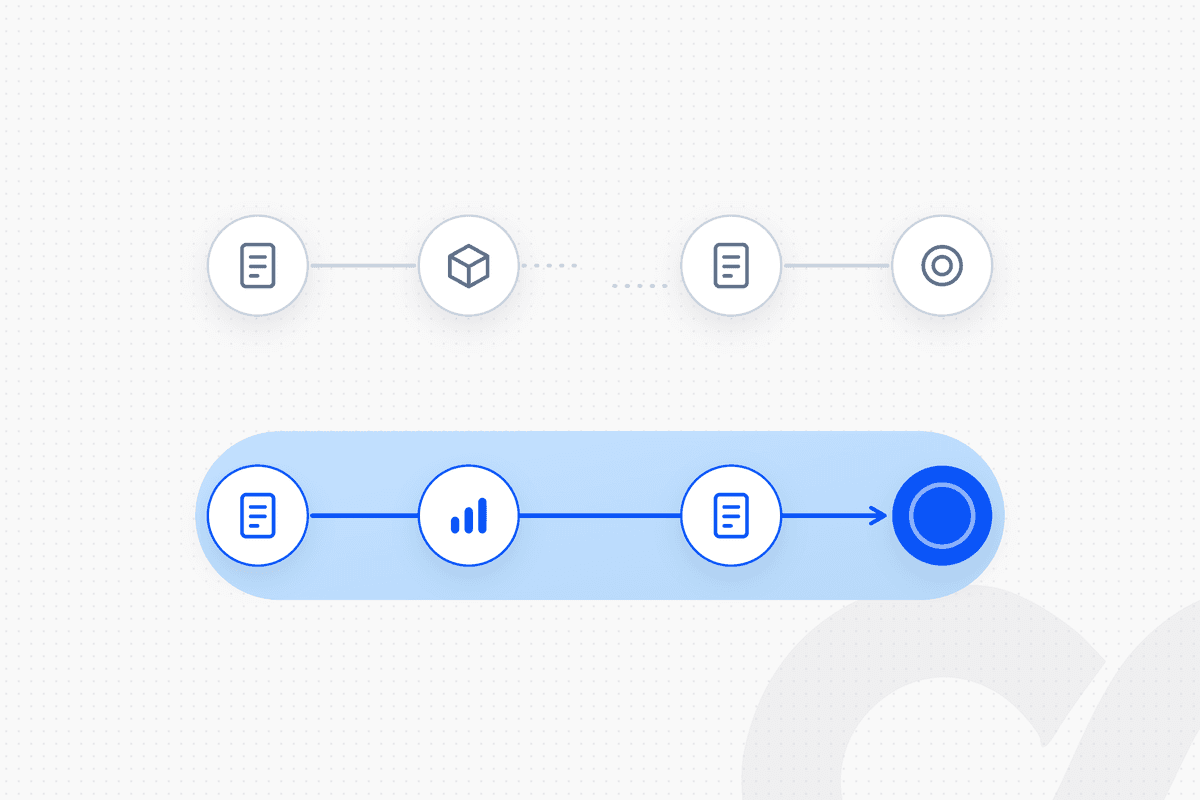
Order-to-cash is built for a company that ships goods against an order. Contract-to-Cash is built for a company whose revenue starts with a contract that changes over time. Order-to-cash runs order → invoice → payment → cash applied. Contract-to-Cash starts one step earlier and carries ramps, amendments and usage terms through billing, revenue and collections. For B2B SaaS, order to cash automation alone leaves the riskiest gap uncovered: the handoff between the signed contract and the first correct invoice.
That gap is where finance teams find under-billed renewals, missing ramp steps and invoices that hit the ERP with no revenue schedule behind them. Your auditors will trace every one of those back to the contract. This post maps both flows side by side, names the six handoffs where SaaS data drops and gives each one a control and an owner.
Key takeaways
- Order-to-cash starts at the order; Contract-to-Cash starts at the signed contract. For B2B SaaS, the contract is the source of every invoice and every revenue entry.
- An invoice is only as accurate as the billing schedule behind it, so the handoff from signed contract to billing schedule deserves the first check.
- Contracts change after signature. ASC 606 defines a contract modification as "a change in the scope or price (or both) of a contract that is approved by the parties," and each one has to reach billing and revenue.
- Six handoffs carry most of the risk: quote to contract, contract to billing schedule, amendment to billing, usage to invoice, payment to cash applied, and billing to the ERP revenue schedule.
- Each handoff needs a fixed check, a named owner and an exception path, so nothing waits on someone's memory at month-end.
Order-to-cash vs Contract-to-Cash at a glance
The two processes share their back half and differ at the front. Both end with an invoice paid and cash applied in the ledger. They differ in what starts the process and how often its terms change.
| Order-to-cash | Contract-to-Cash | |
|---|---|---|
| Starts with | A customer order or purchase order | A signed contract |
| Unit of work | One order, one shipment, one invoice | One contract, many invoices over its term |
| Terms change after start? | Rarely; a new order replaces the old one | Often: ramps, upsells, co-terms, renewals |
| Billing trigger | Shipment or delivery | Schedule dates, milestones, usage |
| Revenue trigger | Usually at delivery | Over the term, per the contract's obligations |
| Where it breaks | Fulfillment and credit holds | Contract terms that never reach billing |
| Typical owner of the front end | Sales ops and fulfillment | Sales, deal desk and revenue accounting |
What is order-to-cash?
Order-to-cash (O2C) is the process that turns a customer order into collected cash. The classic flow is order received → credit check → fulfilled and shipped → invoiced → payment received → cash applied → posted to the general ledger.
The process was designed around a complete instruction. A purchase order names the item, the quantity and the price, and the invoice follows the shipment. If the customer wants something different next month, they place a new order. That design makes order to cash automation simple to scope: each order is self-contained, so each step can run on rules from the order record.
For contrast, procure-to-pay is the mirror image on the buying side: requisition → purchase order → goods received → vendor bill → payment. Order-to-cash sits in AR; procure-to-pay sits in AP.
What is Contract-to-Cash?
Contract-to-Cash is the process that turns a signed contract into correct invoices, correct revenue entries and collected cash for the whole contract term. The flow is quote → signed contract → billing schedule → invoices → payment → cash applied → synced to the ERP → revenue recognized.
The difference is that a SaaS contract is not a one-time instruction. A three-year agreement can carry a price ramp, a free first month, a usage allowance with overages and an option to add seats at a set rate. Then it changes. The revenue standard treats those changes as a formal event: ASC 606-10-25-10 defines a contract modification as "a change in the scope or price (or both) of a contract that is approved by the parties to the contract," and notes that it may be called a change order, a variation or an amendment (Deloitte DART).
So a Contract-to-Cash process has one job that order-to-cash never had: keep the billing schedule and the revenue schedule in step with a contract that keeps moving. For the full build, see how to automate Contract-to-Cash, step by step.
The two flows, side by side
The flows line up step for step from the invoice onward, and they diverge before it. The table shows where each process gets its instruction at every stage.
| Stage | Order-to-cash gets it from | Contract-to-Cash gets it from |
|---|---|---|
| What to bill | The order lines | The contract lines and every amendment |
| When to bill | Shipment date | Billing schedule built from contract dates |
| How much to bill | Order price × quantity | Ramp step, committed amount or metered usage |
| What changes it | A new order | An amendment, renewal or usage report |
| How revenue follows | At delivery | Revenue schedule built from the same contract |
Order-to-cash: order → ship → invoice → payment → cash applied → GL.
Contract-to-Cash: quote → contract → billing schedule → invoice → payment → cash applied → ERP → revenue schedule.
Where B2B SaaS handoffs break
Six handoffs carry most of the risk in a SaaS revenue process. The first two sit before the first invoice; the other four recur throughout the contract term. Each entry below follows the same template: what happens, why it breaks, the control and the owner.
1. Quote → signed contract
The signed contract is the instruction, not the quote. Quotes go through redlines, side letters and last-minute discounts before signature.
- Why it breaks: Billing is set up from the quote or the CRM opportunity, and the redlined terms never reach it.
- Control: Compare the signed document's commercial terms (price, term, start date, payment terms) with the CRM record before the deal is marked ready to bill.
- Owner: Deal desk or revenue operations.
For contracts signed in DocuSign, see how DocuSign fits into a Contract-to-Cash workflow.
2. Contract → billing schedule
A ramp, a free month or a delayed start has to become dated lines in the billing system. If it doesn't, the first invoice is right and the thirteenth is wrong.
- Why it breaks: Someone sets up a flat subscription and plans to change the price at the anniversary. Then nobody does.
- Control: Build the full schedule at setup. Billing systems support this. Stripe's subscription schedules "automate changes to subscriptions over time," with up to 10 current or future phases, each able to change the price or quantity (Stripe docs). Check every new schedule against the contract before the first invoice goes out.
- Owner: Billing specialist, with a reviewer for the first invoice on every new contract.
A hypothetical example: a three-year contract priced at $60,000 in year one, $90,000 in year two and $120,000 in year three needs three phases on day one, not one phase and a reminder.
3. Amendment → billing change
Every approved change to scope or price has to reach the billing schedule and the revenue schedule in the same period. Upsells, co-termed add-ons, early renewals and downgrades all count.
- Why it breaks: The amendment lives in a contract repository or an email thread. Billing finds out at the next renewal.
- Control: Treat every executed amendment as a trigger: amendment signed → billing change prepared → reviewed → applied → revenue schedule updated.
- Owner: Revenue accounting owns the decision on how the change is accounted for; billing owns the schedule change.
4. Usage → invoice
Usage terms are only billed if someone reads the meter against the contract each period. Allowances, overages and minimum commitments live in the contract, not in the meter.
- Why it breaks: The usage export arrives, but nobody compares it with the allowance. Ordway, a billing software vendor, tells teams to "look for customers who exceeded allowances but weren't billed for overages" (Ordway).
- Control: Each period, compare usage per customer with the contracted allowance and rate, and hold the invoice run until the variance is cleared.
- Owner: Billing, with sign-off from the finance lead on any overage the account team wants to waive.
5. Invoice → payment → cash applied
Payment to cash applied is the handoff order-to-cash already handles, and it still breaks when remittance doesn't name the invoice. SaaS customers pay several invoices in one transfer, short-pay a disputed line or pay the wrong entity.
- Why it breaks: Payments land as unapplied cash, and the AR aging overstates what is overdue.
- Control: Match on invoice number first, then amount, then a combination of open invoices, and send anything left to a named person with the candidates attached. See how to automate applying incoming payments to open invoices.
- Owner: AR specialist.
6. Billing → ERP and revenue schedule
An invoice in the billing system is not finished until the ERP has the invoice, the payment and a revenue schedule built from the same contract. That is the record your auditor tests.
- Why it breaks: The integration posts the invoice, but the revenue schedule is created by hand, or not at all, and the two drift.
- Control: Tie billing to the ERP daily on shared customer and invoice IDs, and check that every new contract line has a revenue schedule. Decide upfront which system is the source of truth for revenue.
- Owner: Revenue accounting, with the controller reviewing exceptions at close.
If you want to see these six checks mapped onto your own stack, book a workflow review and we will walk your contract-to-invoice path with you.
Why order to cash automation alone doesn't close the gap
Order to cash automation speeds up the steps after the order, but a SaaS invoice is only as correct as the contract terms behind it. Automating reminders and payment matching doesn't help if the invoice was built from the wrong terms.
Teams usually try one of three ways to cover the gap, and each has a real strength:
| Approach | Strength | Where it struggles in Contract-to-Cash |
|---|---|---|
| General-purpose AI agents | Flexible with messy documents | Behavior is chosen at runtime, so the same contract can produce different results; hard to evidence for audit |
| Horizontal automation platforms | Connect almost any two systems quickly | Your team owns the logic, the exceptions and every fix when an API changes |
| DIY scripts and middleware | Exactly fitted to today's process | Key-person risk; rarely documented as a control |
The trade-off is flexibility against governance. Horizontal platforms win on raw connectivity. A Contract-to-Cash process that has to survive an audit needs the same steps on every run, a named approver for every exception and a record of what ran.
Loopfour, the deterministic finance workflow automation platform, takes the governed side of that trade. An AI agent decides what to do at runtime. Loopfour does only what was approved. We build, run and maintain the workflow on your existing stack, so a changed Stripe field or a new NetSuite requirement is our fix to make.
What a governed Contract-to-Cash workflow looks like
A governed Contract-to-Cash workflow uses AI for one scoped task and fixed rules for everything else. Here is the shape of the flow on a common stack:
contract signed in DocuSign → Contract Agent extracts price, term, ramp and usage terms (confidence-checked) → anything below the threshold goes to a person → finance approves the billing schedule in Slack → schedule created in Stripe → invoices issued on the schedule dates → payments matched on rules → invoice, payment and revenue schedule posted to NetSuite → exceptions routed to named owners → execution tree records every step
The human control points are fixed in advance: low-confidence extractions, the billing schedule on every new contract, every amendment and every unmatched payment. Everything else runs the same way on the first contract and the thousandth. That repeatability is what lets an auditor trace an invoice back to the clause that created it.
How to choose: order-to-cash or Contract-to-Cash?
Choose by asking whether your invoices come from orders or from contracts. A company that sells subscriptions and one-off items such as hardware or services needs both: Contract-to-Cash for the subscriptions and order-to-cash for the rest.
| If your revenue looks like this | Design the process around |
|---|---|
| Customers order products; each order is billed once | Order-to-cash |
| Annual or multi-year subscriptions, with renewals | Contract-to-Cash |
| Ramps, co-terms or frequent mid-term upsells | Contract-to-Cash, with an amendment trigger |
| Usage allowances, overages or prepaid commitments | Contract-to-Cash, with a usage-to-contract check |
| A mix of subscriptions and one-off orders | Contract-to-Cash for the subscription lines; order-to-cash for the rest |
Before you change tools, map the six handoffs on your current stack and mark which ones have a named owner and a check that runs every period. The gaps on that map are the work. For the systems view, see how subscription billing works end to end for a SaaS finance team.
Frequently asked questions
What is the difference between order-to-cash and Contract-to-Cash?
Order-to-cash starts when a customer places an order and ends when cash is applied to the invoice. Contract-to-Cash starts at the signed contract and carries its terms, including ramps, amendments and usage, into billing, revenue schedules and collections. For B2B SaaS, the contract is the source of every invoice, so the process has to start there.
What is order to cash automation?
Order to cash automation runs the steps from customer order to applied cash on predefined rules, including order entry, invoicing, reminders, payment matching and posting to the ERP. It works well when each order is a complete, fixed instruction. It does not cover the contract terms that change after signature, which is where SaaS billing errors start.
Where do handoffs usually break in B2B SaaS billing?
The riskiest handoff is between the signed contract and the first correct invoice, because every later invoice inherits its errors. Ramps that never reach the billing schedule, amendments that do not reach billing, usage that is never invoiced and invoices that post to the ERP without a revenue schedule are the common cases. Each one needs a named owner and a check that runs every period.
Is procure-to-pay the same as order-to-cash?
No. Procure-to-pay is the buying side, from purchase request to vendor payment. Order-to-cash is the selling side, from customer order to cash received. They mirror each other, but they sit in different teams and different ledgers, AP and AR.
Do I need a new ERP to move from order-to-cash to Contract-to-Cash?
Usually not. Contract-to-Cash is a process design, not a system. You can keep your CRM, billing system and ERP, and add a governed workflow that carries contract terms between them, checks each handoff and routes exceptions to a named owner.
Can AI run Contract-to-Cash on its own?
Not safely as the system of record. AI is useful for one scoped task, extracting terms from a signed contract, under a confidence threshold with a person reviewing anything below it. The billing schedule, invoices and postings should run on fixed, approved rules so every entry traces back to the contract.
Conclusion
Order to cash automation covers the steps after the order. B2B SaaS revenue starts earlier, at a contract that changes over its term. Put a fixed check and a named owner on each of the six handoffs, starting with contract → billing schedule, and the invoice, the revenue schedule and the cash will all trace back to the same signed terms.
Tell us the one workflow your team dreads. We will show it running. Book a demo.