
Why your close takes ten days — and which four are automatable
A diagnostic post: where the days actually go, based on close-cycle patterns across mid-market finance teams, and which four are recoverable.

Part of the month-end close guide.
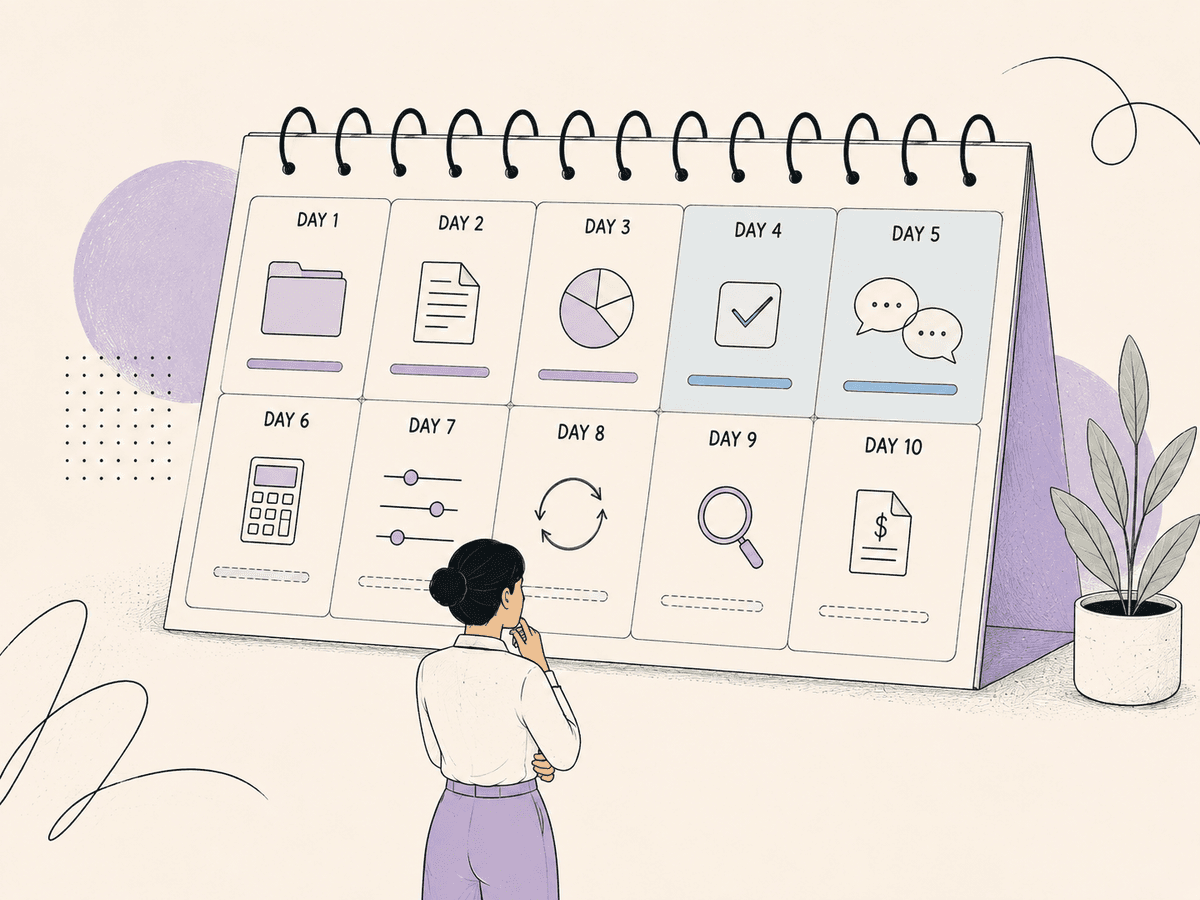
A 10-day close is rarely 10 days of work. In most finance teams it is closer to four or five days of actual work, stretched across 10 calendar days by waiting — on a vendor invoice, on a bank statement, on a budget owner answering one question about an accrual. That distinction decides your whole improvement plan, because you cannot fix a waiting problem by working faster. APQC, drawing on data from more than 10,000 organizations, puts the median monthly consolidated close at six days, top performers at five days or less, and bottom performers at 10 or more calendar days. Most of the gap between those groups is queue time. Four of your 10 days are genuinely recoverable. This post shows where each day goes, which four come back, and which ones no software will ever return to you.
Key takeaways
• More than half the elapsed time in a slow close is waiting, not working. Automation that attacks queue time beats automation that makes an accountant type faster.
• APQC's benchmark, across more than 10,000 organizations, sets the target. Median close is six days (trial balance to consolidated financial statements); bottom performers sit at 10 or more calendar days.
• Four days are recoverable: invoice capture lag, reconciliation backlog, cash application backlog, and manual schedule building. Each is a queue, not a skill gap.
• Four to five days are not recoverable by software: statutory waits, genuine accounting judgment, multi-entity sequencing, and a vendor who invoices late.
• Automated invoice processing changes both cost and speed. Levvel Research puts manual cost per invoice at $10 to $15 and automated at $2 to $3. Published cycle-time benchmarks show 14.6 days → three to five days.
• Determinism matters more than model quality for close work. The FinanceReasoning benchmark (ACL 2025, arXiv:2506.05828) found numerical calculation errors made up roughly 37.5% of failures across 2,238 problems.
Where the days actually go in a 10-day close
The days go to queues. The table below breaks a representative 10-day close into what consumes each day, how it splits between working and waiting time, and whether it is recoverable. Treat it as an illustrative composite of a mid-market close, not a measurement of your team.
| Day | What consumes the day | Working time vs waiting time | Recoverable? | | --- | --- | --- | --- | | 1 | Cut-off, subledger exports, chasing missing vendor invoices | ~3 hours working, remainder waiting on vendors | Partly | | 2 | AP invoice capture, GL coding, approval routing | ~4 hours working, remainder waiting on approvers | Yes | | 3 | Bank statement arrival and reconciliation | ~2 hours working, remainder waiting on statements | Partly | | 4 | Cash application, unapplied receipts, remittance matching | ~5 hours working, remainder waiting on remittance detail | Yes | | 5 | Accrual estimates and questions to business owners | ~3 hours working, remainder waiting on replies | Partly | | 6 | Revenue recognition schedules built by hand in spreadsheets | ~6 hours working, little waiting | Yes | | 7 | Intercompany matching and entity-by-entity sequencing | ~4 hours working, remainder waiting on sister entities | No | | 8 | Flux and variance analysis, gathering explanations | ~4 hours working, remainder waiting on commentary | Partly | | 9 | Consolidation, top-side adjustments, rework from review | ~5 hours working, remainder waiting on the reviewer | Partly | | 10 | Controller review, sign-off, reporting pack | ~3 hours working, remainder waiting on sign-off | No |
Add the working hours and you get roughly 39 hours — about five working days of effort spread over 10 calendar days. The other half of the calendar is queue.
Why is month-end close so slow
Month-end close is slow because the work sits behind information that arrives late and unevenly. Nobody in the close is idle. They are blocked, and blocked time looks identical to slow time on a calendar. Three structural causes produce most of the delay:
• Information arrives after the period ends. A vendor invoice dated the 28th can land on the 6th. Ardent Partners reports that over 60% of invoices still require some human interaction, so every late arrival also consumes a person.
• Work batches at cut-off instead of running continuously. Teams reconcile once, at close, rather than daily. A month of unmatched transactions then becomes a two-day problem in a two-day window.
• Errors surface at review, not at entry. IOFM puts the manual invoice error rate at roughly 2%, against below 0.8% when automated. Every error found on day nine costs a rework loop, and rework loops are why day 10 exists.
What month-end close cycle time actually measures
Month-end close cycle time measures elapsed calendar days from trial balance to consolidated financial statements. It is a calendar measure, not an effort measure, which is why headcount rarely moves it. Add a person to a close where four days are spent waiting and you have added capacity to the part of the process that was never the constraint.
Reduce close time by removing queues first, then by removing effort. Loopfour, the deterministic finance workflow automation platform, is built around that ordering: workflows run continuously through the month, so the close inherits a clean starting position rather than a backlog.
The four recoverable days
Four close days come back reliably, because each is a queue created by batching rather than by judgment. Every one can be expressed as a deterministic step-flow across systems you already run.
Recoverable day one: invoice capture lag
Invoice capture lag is the delay between an invoice arriving in an inbox and appearing coded in the ledger. Most teams process invoices in one batch at cut-off, which turns a steady trickle into a wall. Continuous capture removes the wall.
A deterministic step-flow in Loopfour Studio:
• The Invoice Agent monitors the AP inbox in Gmail or Outlook continuously through the month, not at cut-off.
• It extracts vendor, invoice number, amount, tax, PO reference and GL code, returning a confidence score per field.
• Fields above the confidence threshold post directly to NetSuite, QuickBooks, Xero, Sage Intacct or Rillet.
• Fields below the threshold route to a human-in-the-loop approval block in Slack, where an AP clerk confirms one value.
• A duplicate check against the prior 90 days runs as deterministic code, before posting, on every invoice.
• Each step writes to the execution tree, so an auditor can trace any posted invoice back to the source email.
The scoped AI task is extraction from a document. The human control point is the threshold-triggered approval. Everything downstream — matching, duplicate detection, posting — is programmatic and identical on run #1 and run #1,000,000.
Recoverable day two: reconciliation backlog
Reconciliation backlog is a month of unmatched bank and processor transactions compressed into the close window. The fix is frequency, not speed. A reconciliation that runs daily has nothing left to clear on day three.
A deterministic step-flow:
• A scheduled run pulls posted bank transactions and Stripe payouts every morning.
• Matching rules apply in fixed order: exact reference match, then amount plus date tolerance, then fuzzy payee match.
• Matched items post to the ledger in NetSuite or QuickBooks automatically.
• Unmatched items open as exceptions in a Slack queue with the candidate matches attached.
• The Controller resolves exceptions during the month, in minutes per day, rather than in a block at close.
Daily reconciliation converts one close-window day into about 10 minutes a morning. The work does not disappear. It stops being on the critical path.
Recoverable day three: cash application backlog
Cash application backlog is unapplied cash sitting between the bank and the AR subledger. It blocks the AR close, distorts DSO monitoring, and triggers dunning emails to customers who have already paid.
A deterministic step-flow:
• The Receipt Agent reads remittance advice from Gmail or Outlook and from the customer portal export.
• It extracts invoice numbers, amounts and customer identifiers, each with a confidence score.
• Deterministic matching runs in order: exact invoice number, then amount plus customer, then partial or split payment against open AR in NetSuite or Sage Intacct.
• Short pays above a set variance create a credit memo draft and route to the AR manager for approval.
• Anything unresolved lands in an exception queue. Applied cash syncs back to Salesforce or HubSpot so the account owner sees current balances.
The AI task is reading a remittance document. The human control point is credit memo approval and exception review. Nothing is written to the ledger on a model's judgment alone.
Recoverable day four: manual schedule building
Manual schedule building is the day spent constructing revenue recognition and amortisation schedules in spreadsheets. It is pure calculation and pure repetition, which makes it the single best automation candidate in the close.
This is also where the case for determinism is strongest. On the FinanceReasoning benchmark (ACL 2025, arXiv:2506.05828), covering 2,238 problems, the strongest reasoning model — OpenAI o1 with Program-of-Thought — reached 89.1% on the hard subset, and numerical calculation errors accounted for roughly 37.5% of failures. A model should never be the thing that computes your schedule.
A deterministic step-flow:
• The Contract Agent reads the signed contract from DocuSign, PandaDoc or Dropbox Sign.
• It extracts term dates, performance obligations, billing schedule and variable consideration, with confidence scores.
• Extractions below the threshold route to the Revenue Manager for approval before anything is used.
• A sub-workflow builds the schedule in code against the ASC 606 (FASB) five-step model. The arithmetic is programmatic, never generated.
• Period journal entries post to NetSuite or Rillet on a schedule, with the execution tree recording inputs, rules applied and output.
• A contract amendment recorded in Salesforce or HubSpot triggers a re-run and a diff for review.
Most automation tools ask a model to compute the numbers. Loopfour uses AI to read the contract and deterministic code to compute the schedule instead.
What four recovered days look like
Here is a modeled scenario, not a customer result. Take a company at the APQC bottom-performer mark of 10 calendar days. Move invoice capture to continuous, reconciliation to daily, cash application to rules-plus-exceptions, and schedule building to a deterministic sub-workflow.
Modeled result: 10 days → six days, landing at APQC's median rather than its tail. In the same modeled scenario, invoice cost moves from Levvel Research's manual $10 to $15 range toward the automated $2 to $3 range, and the error rate moves from IOFM's 2% figure toward below 0.8%. These are projections from published benchmarks applied to a representative company, not measured results. Your numbers depend on volume, entity count and how much of the close already runs continuously.
The days you cannot recover
Some close days are structural. Selling you a five-day close when four of your days are statutory would be dishonest, so here is the boundary.
Statutory and third-party waits
Statutory and third-party waits are fixed outside your company. Bank statements close when the bank closes them. Payroll providers deliver on their own calendar. Automation can shorten what happens after the data arrives, never when it arrives.
Genuine accounting judgment
Genuine accounting judgment cannot be automated, and should not be. Whether a receivable is impaired, whether a contract modification creates a new performance obligation, how to estimate a warranty reserve — each carries personal accountability. Loopfour prepares the schedule, assembles the evidence and routes the decision. The Controller decides.
Multi-entity sequencing
Multi-entity sequencing imposes a hard order on the close. Subsidiary ledgers close before intercompany elimination, which closes before consolidation. Automation can compress each stage and remove the handoff delay between them. Automation cannot run stage three before stage two.
A vendor who invoices late
A vendor who invoices on the 6th for services delivered on the 28th sets your accrual timeline, not you. The workable response is a better accrual, not a faster process: Loopfour Studio can build a recurring accrual from the purchase order and prior-period actuals, then post a true-up when the invoice lands. The wait stays. The blocked close day does not.
How to decide which close day to attack first
Attack the day with the largest ratio of waiting time to judgment content. That test ranks close work better than volume or headcount does, because it identifies queues rather than effort. Work through four questions in order:
• Does this day contain a decision a person must sign? If yes, it is a review day. Compress the preparation around it, do not target the day itself.
• Is the delay caused by batching? If the task could run daily but runs monthly, it is a recoverable queue. Invoice capture, reconciliation and cash application almost always fall into this group.
• Is the output pure calculation? Schedules, amortisation and allocations are deterministic. They belong in code, given the 37.5% calculation-error share the FinanceReasoning benchmark found in model failures.
• Who controls the input timing? If a third party controls it, the day is not recoverable. Build a better accrual instead.
| Close area | Waiting-to-judgment ratio | Priority | | --- | --- | --- | | Cash application | High waiting, low judgment | First | | Invoice capture and coding | High waiting, low judgment | First | | Bank reconciliation | Medium waiting, low judgment | Second | | Revenue recognition schedules | Low waiting, high calculation | Second | | Accruals and estimates | Medium waiting, high judgment | Third, partial | | Consolidation and sign-off | Low waiting, high judgment | Do not automate the decision |
The direction of travel is not unusual. Protiviti's 2025 SOX survey found nearly 70% of organizations have implemented automated compliance tools, and 68% are prioritising more technology and automation.
Frequently asked questions
Why is my month-end close taking 10 days?
A 10-day close reflects queue time more than workload. A representative 10-day close contains about five working days of effort; the rest of the calendar is spent waiting on vendor invoices, bank statements and answers from business owners. APQC places 10 or more calendar days in the bottom-performer band, against a median of six days.
How do I reduce close time without hiring more accountants?
Reduce close time by moving recurring work out of the close window and into the month. Continuous invoice capture, daily reconciliation and rules-based cash application mean the close starts from a clean position instead of a backlog. Headcount rarely helps, because month-end close cycle time is a calendar measure and the constraint is waiting, not capacity.
What is a good month-end close cycle time?
APQC, using data from more than 10,000 organizations, reports that top performers complete the monthly consolidated close in five days or less, the median is six days, and bottom performers take 10 or more calendar days. The measure runs from trial balance to consolidated financial statements. Six days is a realistic target for most mid-market finance teams; five days requires multi-entity sequencing to be automated already.
Which close tasks should I automate first?
Automate the tasks with high waiting time and low judgment content first: cash application and invoice capture. Both are high-volume, rule-governed, and currently batched at cut-off, which is what turns them into close-window days. Revenue recognition schedule building comes next, because it is pure calculation and belongs in deterministic code rather than in a spreadsheet or a model.
Is automating the close risky from an audit perspective?
Deterministic automation improves auditability rather than reducing it. Loopfour records an execution tree for every action — the inputs, the rules applied, the output and the approver — so any posted entry can be traced to its source document. Loopfour is SOC 2 Type II certified with a SOC 1 audit underway, encrypts data with AES-256 at rest and TLS 1.3 in transit, and never uses customer data to train models.
Can AI close the books on its own?
No, and any vendor claiming otherwise is describing something you should not sign off on. The FinanceReasoning benchmark (ACL 2025, arXiv:2506.05828) found numerical calculation errors made up roughly 37.5% of model failures across 2,238 problems. Loopfour calls AI for scoped tasks only — reading a contract, extracting an invoice — with confidence thresholds and human fallback, while calculation, matching and posting run as deterministic code.
What does Loopfour do that a generic automation tool does not?
Loopfour is a managed service, not just software. We build, monitor and maintain the workflows on your existing stack — QuickBooks, NetSuite, Xero, Sage Intacct, Rillet, Stripe, Salesforce, HubSpot, Attio, Slack, Gmail, Outlook, DocuSign, PandaDoc, Dropbox Sign and Workday — and your team approves only the exceptions. Loopfour is not an AI agent with a wrapper. Execution is programmatic and identical on run #1 and run #1,000,000.
Start with the four days you can actually take back
Your close is not slow because your team is slow. It is slow because information arrives late and work batches at cut-off. Four days — invoice capture lag, reconciliation backlog, cash application backlog and manual schedule building — are queues you can dissolve. The rest are structural, and we will say so rather than sell around them.
Loopfour Studio is in Early Access, free during beta, with White-Glove Onboarding and no credit card. We map your close day by day, mark each day recoverable or structural, and show you the workflows that remove the recoverable ones.
Book a workflow review.